Showing posts with label features. Show all posts
Sunday, March 24, 2019

The new version of UMS will bring new shorteners faster

There is a new version (2.11) of URL Multishortener. It does not bring great news in terms of its functionalities, but it does have a new feature that will be useful both for me and for you, the users.


New shorteners and available at the moment


Now UMS loads the shorteners from an external database. In this way it is faster and easier to have new shorteners available in the extension.

In particular, the shorteners are loaded from the same site as shorteners.net and Lanza.me, which will favor the use of the 3 tools as a whole; what you find in each one will also be available in the others.

So far I had to program the functionalities or the existence of each shortener separately and upload the new version, which was slower.

Now it's done automatically. The difference with which new shorteners may appear in the mentioned tools will be a maximum of one day.

Acortador Dwindly logoAcortador UrlCero logo


Acortador uii.io logologo de clicksfly


log de shrtly

logo de uizio

Previously (June 30, 2018) had already been added: UrlCero, Dwindly and U3O. With the new update you will have available: ShrtFly, Uiz.io, ClicksFly, Miniurl, Shortzom and Voxc which counts 4 visits per IP.

Note: The new shorteners are only loaded when the extension is restarted or when the browser is reopened.


Other improvements and minor corrections


Fixed a problem that eliminated credentials of shorteners when they were added to favorites.

The redirects from shink.in before showed two notifications, that now does not happen anymore.

In Firefox, adding a shortener in favorites did not show the notification that announced it, it has also been fixed.

The panel to enter an alias for shorteners that allow it does not let the accompanying text stand out.

The notification shown by shorteners that do not have APIs and that therefore send to the main page when they are selected, has been improved.

By mistake he had removed the part of the code that translated the popup texts. Now you can find them in Spanish and not only in English.

Now falls of the Internet connection and its recovery are detected.


Detecting advertiser pages with SkimLinks


One of the features of UMS is that it makes use of several SkimLinks APIs. Thanks to this automatic affiliation platform, UMS can notify you of the pages where you can earn money with this platform.


SkimLinks also has a shortener, and in this way you can shorten the links on these pages to earn money that will go to your SkimLinks account.

To activate this option you have to open the contextual menu within UMS and activate the option that you will find there.

For some time it has been failing to detect the sites of the available advertisers, but this problem has already been solved.

This was because the new API of this platform, which was already renewed in previous versions, included a limit of requests that the extension exceeded and caused an error that prevented its correct operation.

Now everything works normally; although it takes about 3 minutes to get this functionality since the browser starts.


Best!
Thursday, February 22, 2018

More and better notifications

More notifications are added that will make the extension more intuitive and allow you to know, if that is what happens, what is wrong.

This will help to know if the problem is the credentials of the API, itself, some parameter or the site in general. This will make it easier to find the solution.


Among them we have:

  • Informational: When credentials are deleted, when a shortener is hidden or when you add a shortener to favorites are new notifications that have been added, like other actions in the past.
  • Errors and warnings: In some shorteners (all the most recent ones), when a response is received that is not the expected one: there are several types of errors that can be detected and offer a solution, in addition to many others that will be notified with their message corresponding error.

The errors can be returned by the shortening API. They can be of the type "invalid URL", "invalid API token" or "invalid API call".

Other errors can be HTTP status codes. In this case the typical 4xx or 5xx If an error of this type is received also, along with a simple description, it will be indicated.

Other less likely error messages may also appear, such as problems that may appear internally in the APIs or having chosen one that was not due.

When possible the extension will give you extra information to solve this problem. In any case if someone needs to contact me for this reason it would be very useful to specify the error.

Note: Pending approval of the latest version, this option may not yet be available in all versions of the extension.

New feature: You can now use custom aliases

It is now possible to establish the alias or identifier of short links. In this way you can get shortened links more descriptive.

All you have to do is, once the extension is open and locate the shortener you want to use, display the options of the shortener with the secondary mouse button and choose "Shorten with aliases".


Not all shorteners offer this possibility, but all those who offer it have this option in UMS.

A new panel will appear in which you can enter the desired alias. If that alias is not available, the action to be taken depends on the shortener.

Some shorteners send the short link with a new random alias, while others throw an error. In the latter case it will be necessary to reuse the option and choose another different alias.

Note: Pending approval of the latest version, this option may not yet be available in all versions of the extension.

New option; hide shorteners

There is already a large pile of shorteners. Every day there is more and more and the number of them begins to be considerable.

Although there is already a tab to place your favorites shorteners in UMS, now there is a new option to solve this; hide shorteners from the extension.


Now you can hide the shorteners that give you the most rage. All you have to do is open the extension, find the shortening and display its contextual menu. Below the menu you will find an option called "Hide shortener".

Once used the shortener in question will disappear from the tabs. If you have saved credentials are deleted, they are also removed from favorites if you had them there.

If you want to see shorteners that have been hidden again, you can do it from the button that you will find in the configuration of the extension.

Note: Pending approval of the latest version, this option may not yet be available in all versions of the extension.

Wednesday, January 17, 2018

The new UMS is in Firefox

URL Multishortener is now available with all its improvements in Firefox. Previously the extension in this browser did not come incorporating the most recent improvements that presented for Chrome and Opera.

Although it was the first browser for which it was launched, the transition between the browser APIs was not as agile as it should be and many options were not available, so UMS in Firefox was not only without the improvements , but also without many important shorteners.

Link: lanza.me/4g


Sunday, December 17, 2017

Shortcut Menu improved and 3 more impressive shorteners

The shortcut menus for all shorteners have also been improved in the extension. Now look better, adapting to the extension environment so that there are no parts that can not be seen (it would be great if these menus were shown with a defined width and out of the main menu of the extension, but for now I could not do this).


In addition, new shorteners have been added:


Tmearn, which has just sent late payments and whose fees are very high and can make you suspect, so I recommend using it through the metazartador of Lanza.me). From a minimum of $ 2.8, payments can be requested at any time from $ 3, via PayPal, Payza, Bitcoin and Payeer.


Oke.io, also with some delays in payments, although less accused. it is available in Lanza.me. From a minimum of $ 2.20 (most do it at $ 2.40), we can collect our balance from $ 5 each day through Bitcoin, PayPal, Payza and Skrill.


Linclik, of which at the moment I have only received one payment, his payment rates are the same for all countries without exception $ 1.8 per thousand visits, gradually increasing from the initial 1.5. Pay by Paypal or Payza, once the minimum of $ 5 has been reached.

Best regards to all!
Saturday, September 30, 2017

Make Shink.in API and all his links work again

Shink.in suffered a major stumbling block. For some reason its domain was blocked worldwide and it is not possible to access it or the links through it. They have enabled a new one; Shink.me, which works just like the old one. Everything is ready in UMS to return to the routine with this shortener.


How to use shink.me instead of shink.in


This change has already been applied in UMS so it is now possible to shorten URLs normally using the new domain. If you have never used Shink.in through UMS you have to do it as with any other shortener; adding the credentials requested. If you were already using it you have to delete the previous credentials and use the new ones.


Another way to change the Shink.in endpoint API to Shink.me is to use the configuration. If you right click on the UMS icon you will see an option called 'configuration'. A panel will be displayed by clicking on it:


From there you can easily edit the entered credentials, sometimes they are routes and in other codes. With Shink.in you must introduce an API endpoint, that is, a path to a web address, which you can find in your Shink.in panel, under the Tools -> API menu.

In addition, it is not necessary to use exclusively the version of the API of Shink.in that returns plain text, but both versions are compatible with the extension. It will now also work with or without the example address that is included in the documentation.


Redirect all old links when you are there


As a special extra, there is a new option available in the Shink.in sub-menu in the UMS panel. This allows you to automatically redirect to the new domain when you visit any route of the old one. Keep the original route so the old links you visit will also work.

Best regards!
Thursday, June 22, 2017

Improved Behavior and 3 new shorteners that pays

In addition to 3 new shorteners that are sure to give no problems, there are some small improvements that you may not notice in URL MultiShortener.

This is a better behavior of the extension, preventing other addresses are shortened that are not desired when there is more than one window open (until now it was possible to open several windows of the extension if we were unfolding them from the context menu of the browser).

This is now no longer possible, since UMS closes the previous window when opening a new one, even when the popup is displayed as it is done generally from the button of the extensions bar.

Another improvement is that the links obtained in the clipboard no longer include a line break that is sent from the shortener. It is now much easier to keep up with work when links are shortened with the context menu button of the browser, having a URL selected.

The new added shorteners are these:


UrlCloud.us although I really still do not know if it pays, many are recommending it, and is that it is giving a good service for Latin America. Despite having a worldwide price of $ 1.60, it now offers more for most countries in the region. Pay at $ 5, via Paypal.


Short.es belongs to the same owner of Short.am so you can practically count on our trust from the beginning. We can both advertise and earn revenue. Among the rates the highest paid countries are the United Kingdom and the United States with 2.5 $ each per thousand. The minimum CPM is $ 1.50. Payments are sent by Paypal once reached the 5 $.


Excuse me, this looks scam:

Urle.co: with barbaric rates for all countries, starting from a minimum of 2 $ CPM. The highest-paid countries are Australia, the United States, Canada and the United Kingdom, all of them at $ 5.00 per thousand. From just $ 1 we can withdraw our profits via Paypal or WebMoney.


They are ready to use on your extension. Best regards!
Sunday, March 12, 2017

A new shortener and a new button

Surely you have already seen the new shortener; Adbull.me. Their payment rates are extraordinary and is now available in MultiShortener URL. But he does not come alone.


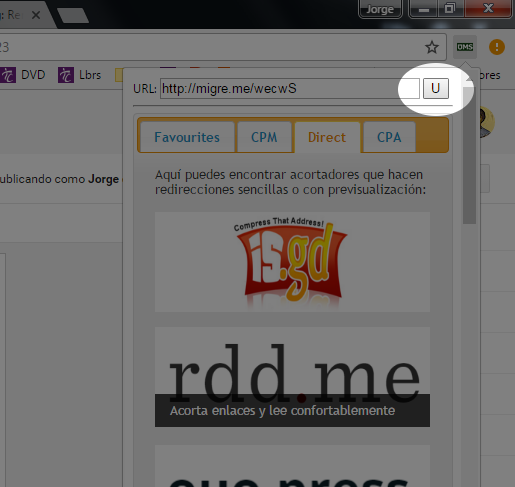
Now there is also a small historial that allows us to retrieve the last short URL obtained, and also inserts it into the text box of the extension to make it easier to camouflage it with simple shorteners.


All you have to do is press the button that you will find next to the box for the URL in the extension. If you have not yet shortened URLs since this last update, then it will not work, just wait to shorten some address and the functionality is now available.

The extension automatically takes you to the Direct tab. This is because it is not allowed to creating rings of links with similar services, by the conditions of virtually all the shorteners they pay,.

Best regards!
Wednesday, March 8, 2017

¡New feature: Short links from text selection!

Now is possible to shorten addresses without having to visit them. If you want to shorten a URL that is published in a web and do not want to enter it, just select it with the mouse pointer and click the right mouse button to display the context menu of the browser.

Step #1 

There you will find a MultiShortener URL icon, only from there you can use this feature. If it is actually a URL, the selected text will go to the text box of the main panel of the extension, which will be displayed in a new window.

Step #2

From there the operation is as always; You select a shortening and if you already have the credentials entered, the short URL will be passed to your clipboard.

Best regards!

Friday, August 26, 2016

Hola, spanish language available and improved favorites tab

This new version of UMS (2.2) has 2 new features. Both important because they affect almost all users. These are:

  • The Favorites tab is now dynamic. You can add and remove favorites shorteners this tab and the changes will take effect immediately for both. You do not need to reopen the extension for the changes to take effect.
  • Spanish has been added as an available language. This latest new is fairly important, because now that it has added a second language is much easier to add more. If someone wants to translate it into another language not available, you can contact me.

I could not send this message without presenting some other new and rare shortener to enjoy:


You have all the information in the extension 'Direct' tab. Best regards!
Tuesday, August 16, 2016

New features and shorteners on board

There are new shorteners in UMS (2.1.3). Below you have the complete list. If you pass the pointer over them in the extension you will see a description.

We have also added improvements to the extension:
  • You can remove the credentials shortener more easily using their respective context menu.
  • Some shorteners show a little message on a black background. Once you have pressed you will not see this information.
  • There's a button on context menu so you can visit the shortener using it, but without having to shorten a link.

The ouo.io alternative (Ouo.io doesn't pay)


Monday, June 27, 2016

Now available for Firefox, Chrome and Opera!


URL MultiShortener is now available for the three more relevant browsers for desktop: ChromeFirefox and Opera.

Monday, June 20, 2016

New Features in UMS version 2

Soon they will also be available in the version of Firefox:


Wednesday, March 30, 2016

Free, easy to use, secure and abominable!


  • All the best shorteners that paid and much other like Goo.gl or Bitly
  • Totally free, no registration and no data collection and secure.
  • Easy use; only push the button or use the contextual menu to access the panel.
  • Indications for get the API key in each shortener.
  • New: One tip to learn more about each shortener before use.
  • New: The shorteners now are classified in tabs; CPM, direct and CPA.

Saturday, March 26, 2016

Short all links with all the best shorteners!

Each day have more and more shorteners on the Internet. This list currently available in the URL MultiShortener browser extension. They also are now separated by tabs; those that generate income by CPM, CPA or no.